Sortment Quests · The secretive colleague posing as an open book
Designing how a self-regulating plan presents itself and keeps you in the loop
Context
Sortment was shaping up into a decent base of foundational primitives that enabled marketers to build targeted comms. In parallel, we complemented these creation workflows with LLMs, in the form of an AI AssistantWhen it comes to preserving context for doing similar kinds of work: chats could be resumed, long-running tasks could be scheduled to run automatically (essentially start new chats with a pre-seeded prompt, on a schedule) – all while they contributed to the workspace's Knowledge Base..
The information exchange model with the Assistant was: one prompt in, and response artefacts that are output against that. This involved manual stitching done by the user, to 'continue' work, or build on top of it.
We wanted to create a surface where Sortment's Assistant could be expected to self-direct an elaborate sequence of long-running tasks, oriented by a goal given to it.
Conceptually, the experience would have to feel like a collection of related activities, foldered/walled in to share context, and strive to refine efforts against a shared goal of the workers it spawns and manages.
The Naming Ritual
We built the first version of this composition as 'Projects'. You'd submit a prompt worthy of what you thought was a 'Project' and hope for the best.
It needed a name that stood out and could be marketed as a standout feature.
After some deliberation, we settled on 'Quests'. The analogy that came with it had us picturing adventurers going out, getting distracted, splitting up work, and setting off on their own sidequests – all of which are attributes that our hallucinating LLMs are capable of.
It also carried the idea of [adventurers] creating a plan up front, scouting the terrain, and putting themselves out there. Plans fail and things get sidetracked, but there is always something to learn.
I used this metaphor to line how the design architecture plays out from here.
We limit the experience to having the human user kick things off (input the ask) – and then have them inherit some of the burden of herding our brave adventurers (monitoring & course corrections).
Launching a Quest
Users would discuss a goal with the Assistant, and then approve the creation of a Quest – this is either explicitly asked for by the human operator, or floated as a suggestion by the Assistant as it picks up signals worthy of a Quest.

Setting a higher bar on user requests
We observed the first few Quests wandering around and too far, or getting their heads stuck in very specific rabbitholes – there was too much drift and plots were being lost; plots that were never clear to begin with.
At the same time, Quests were also eager, finish-line-hungry machines that wanted to wrap things up fast and fire up whatever tools they had in their arsenals – with no hesitation when facing vague scopes.
Generic product-side guardrails weren't going to be enough to curb this behaviour: my goal was to cater to personalised interests of users, which meant holding them accountable for lazy querying — a behaviour to account for in designing for this new era of software, human operators, and LLMs.
When requesting Quests, we tightened acceptance criteria by:
- Negotiating output expectations earlier, so you're not surprised by how the Quest played out, and what it delivered
- Drawing a scaffolding of the plan in advance during the negaotiation, do you don't need to wait to see the actual payload get rendered on the UI.
Also get some context verification done in advance:
- Attempt preliminary analyses in chat without offloading the same mundane task to a step in the Quest – some early discovery work
- Salvage and index as context existing knowledge, insight, analyses or entities that are present in the workspace – especially when they might share this new Quests' directives.
Revealing sequence
Scrapping a vibe-coded kanban interfaceThis isn't some OpenClaw-like machine, celebrating you deploying N number of troops (agents) – the aesthetic was giving 'workaholic'., I forced a linear list of tasks to anchor 'progress'.
The kanban view didn't demonstrate sequence, or the affordance of being able to course-correct based on discoveries that happen in-flight.
We unleashed this view as an experiment to observe:
- How content would sit,
- How/if users would tweak the language,
- How it would structure itself, and
- What configurations the LLM would settle on for these roadmaps.
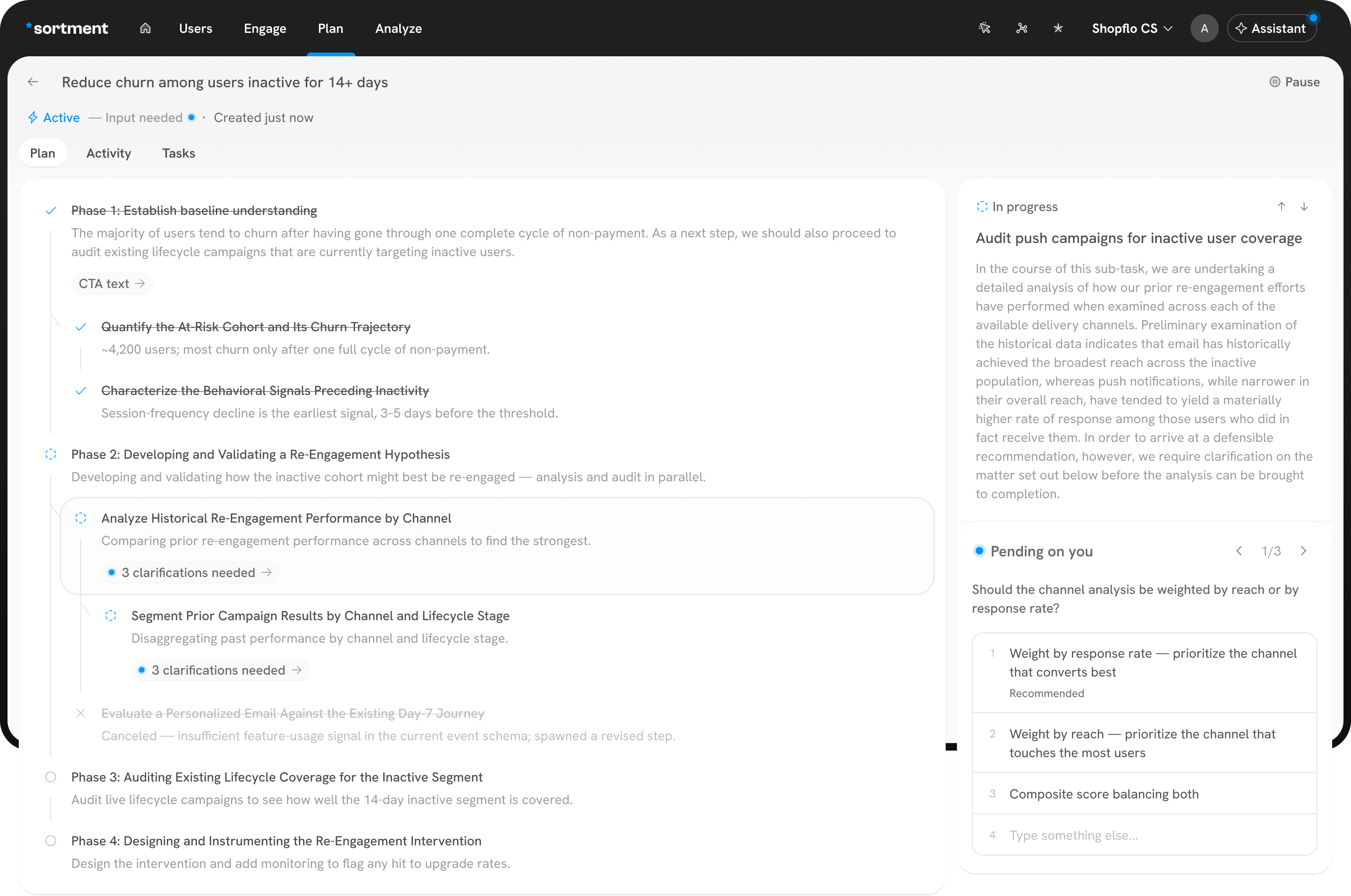 1
11Slop-gen (Illustrative)
The plan allowed a Quest to reveal what was next in mind, along with restrospectively cancelled plans. And more importantly, this gave operators a way to see its current situation in the form of a 'running' step.
Lanterns in the brain fog
Sub-steps sounding awefully similar to each other and their parent steps + summaries repeating or expanding on the title, adding much more friction to how you scan the list of steps on the left; reading it meant inviting yourself to the Quests' brain fog.
The depth of nesting seemed to feed only our desires to see faux intelligence being flaunted around; we need to snap out of the collective trance that is this LLM-master-race-omg-my-computer-can-talk-nerdy-to-me.
Internally, we renamed the parent steps to Milestones, and forced the LLM to output only one level of nested 'steps'. This was done to increase the gravity on these parent steps, dress it up as the 'reporting centre' for the sub-goal that the Quest has identified for it.
We quickly decided to reduce nesting depth. Milestone → step, and nothing deeper than that. Steps would start collapsed behind a "Show steps" toggle.
Milestones become questions, first-person-plural interrogatives.
- "What apps do we target, and how?" not "Phase 2: Re-Engagement Hypothesis."
- No "Phase N" prefixes, no numbering.
Substeps become imperatives, verb-led execution statements.
- "Define target channels"
- "Draft value-prop per app"
- "Create the prioritized opportunity set".
Question at the milestone, verb at the step: this grammatical contrast reinforces the gravity that milestones have without relying just on indentation.
Watching it run
More revealing live-state verb forms were introduced. In-progress steps read as present-progressive actions — Eg: "Creating prioritized opportunity set…", while hinting these at the top as "∞ Crunching" or "Waiting for input" (more on this in a bit).
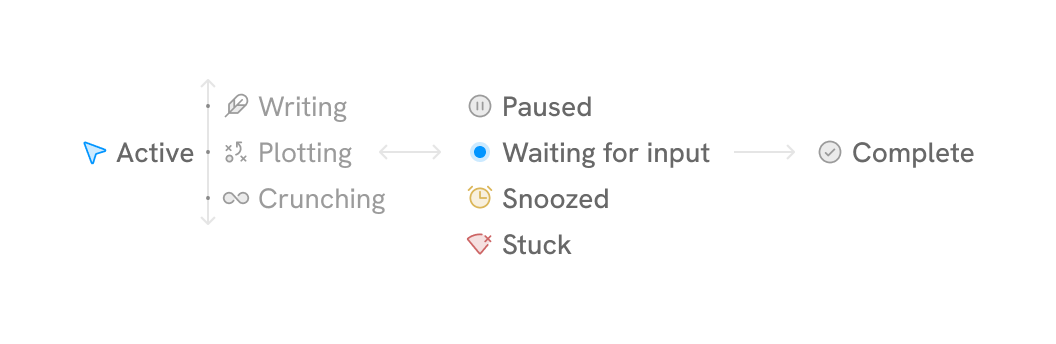
The step's objective was shown in the primary real-estate long after its completion, so coming back to a step meant pushing through the recap everytime. Visually, the varying heights this blob of text occupied had you searching for what mattered.
Over use, it became evident that the thing people were searching for was the outcome of the selected step. So we had the pane demote the Objective, and lead with the outcome.
We also injected explicit formatting rules. Outcome summaries went from flat paragraphs to a lead line with:
- key phrases bolded,
- bullets carrying specifics fanned out,
- and so-whats
Like splashing cold water on a confidence machine, we fed in suppression rules based on what we'd noticed the model loved to flaunt:
- technical approaches to executions
- repetitive reminders about what other steps accomplished
- overexplained Quest ops – redundant when the structure and sequence is already being presented by the UI
This made things much easier to scan, blame, scrutinize, and share.
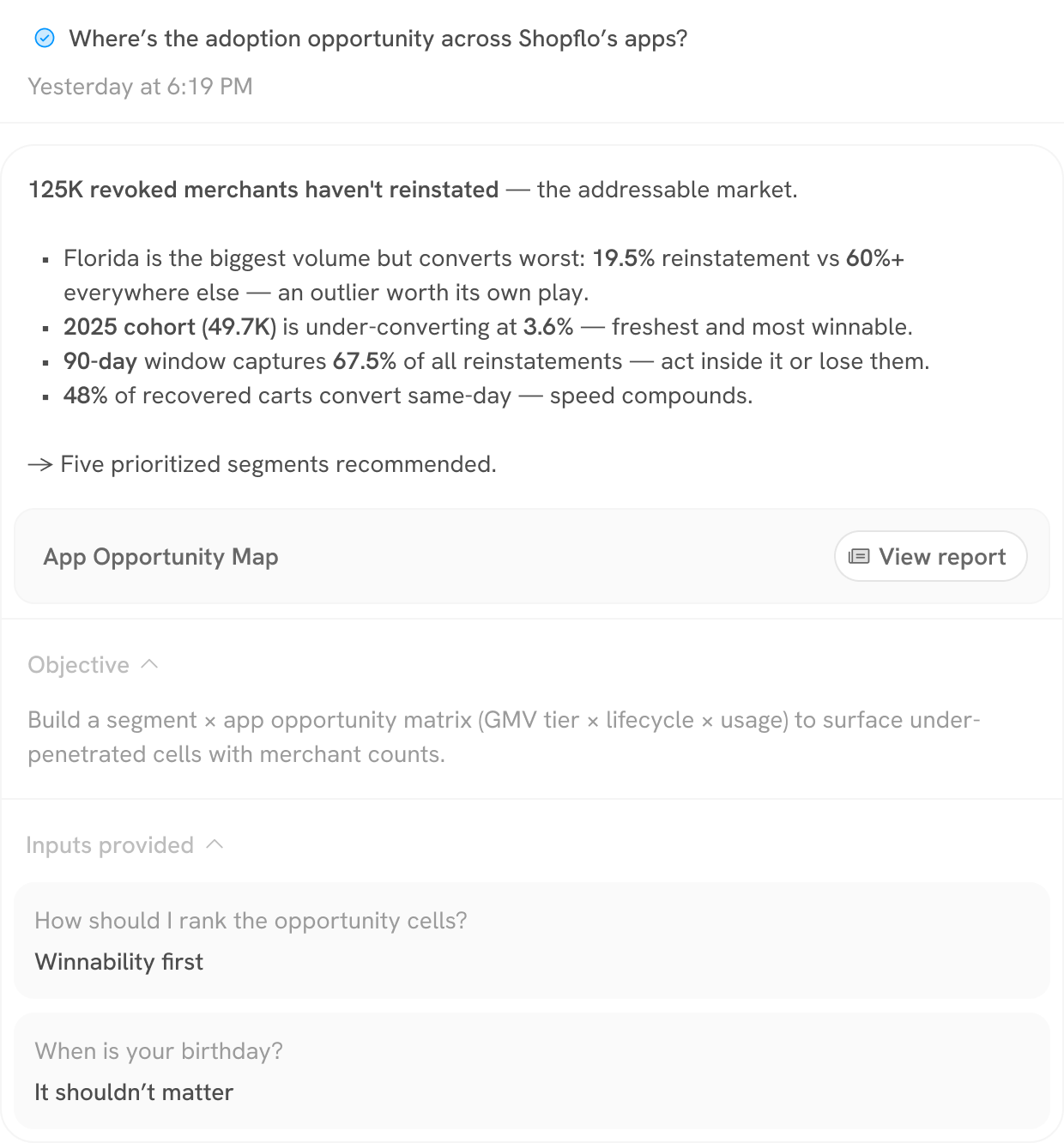
The plan now read as milestones with synthesized reports, throughout its lifecycle.
Ah yes, let's not forget the 'human in the loop'
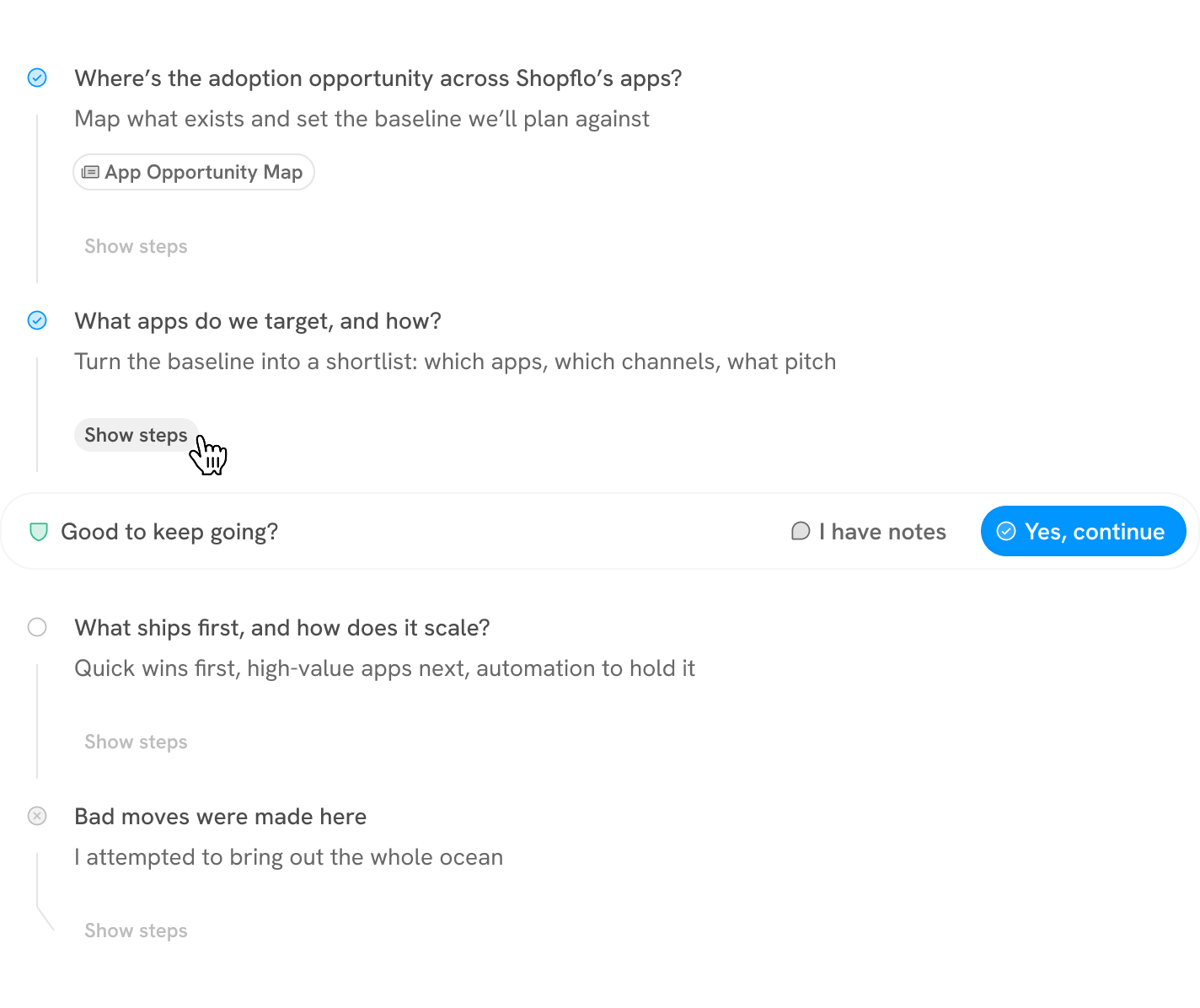
An inline approval breakpoint. The Quest can stop between milestones and ask "Good to keep going?" — as a row in the plan. I have notes lets the operator correct the route before the proceeding. This is the Quest roping in its operator when the road ahead stops resembling the one that was agreed upon.
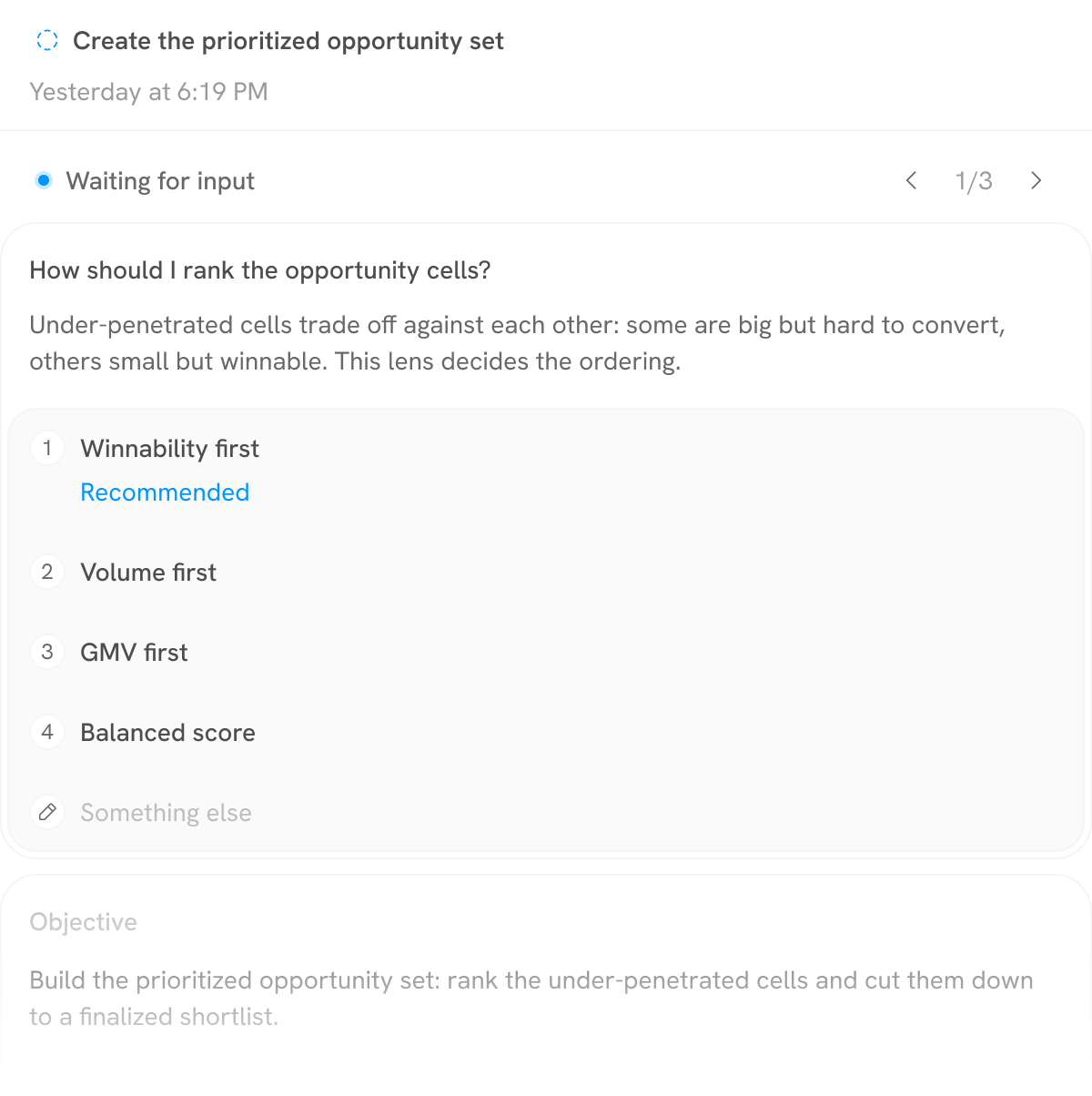
Inputs as a pending-only carousel. Pending inputs float to the top (loud), resolved ones sink into a collapsed strip (quiet).
Where it landed
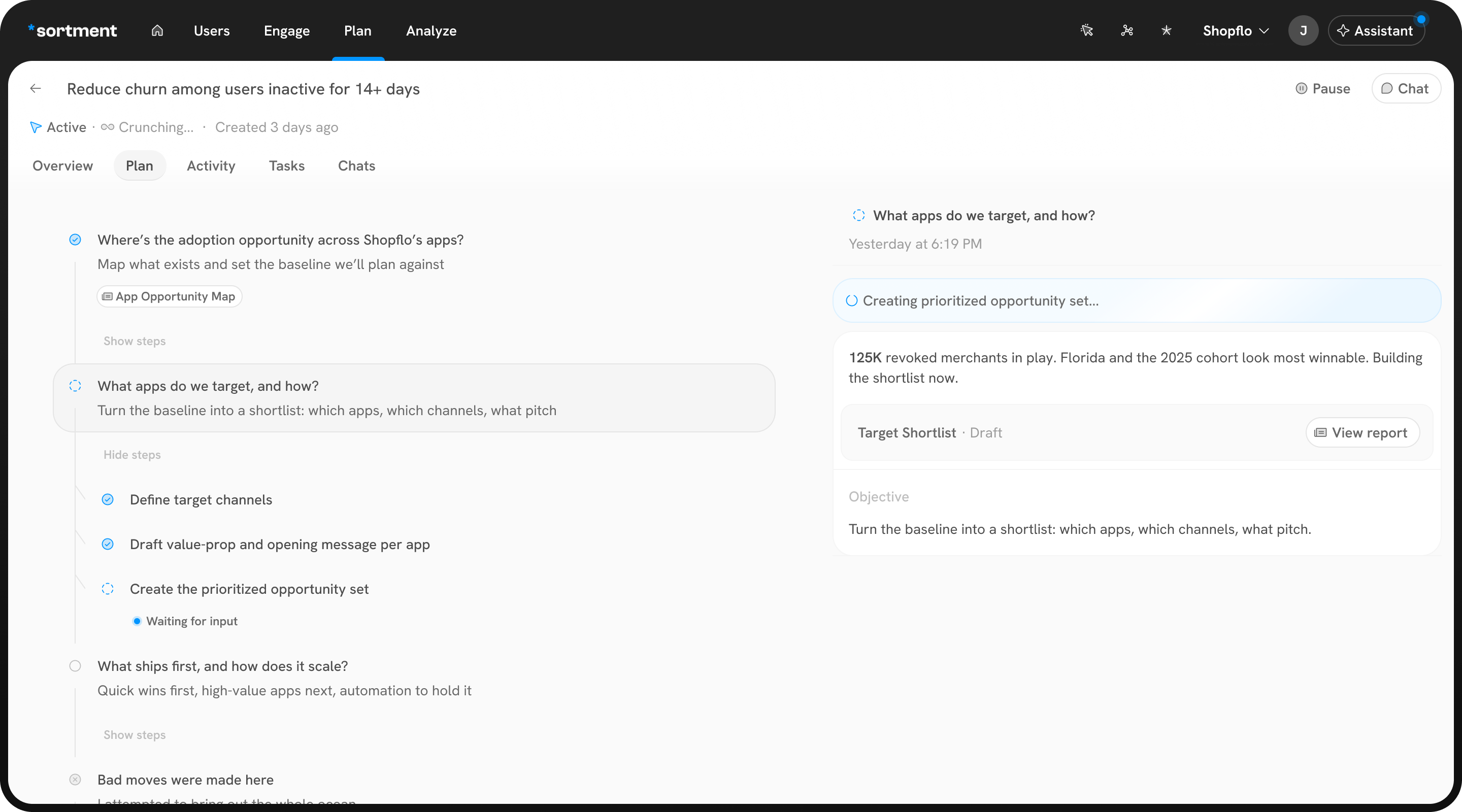 12345
123451New statuses that reveal something more current.
2Scannable outputs. Access detailed reports without needing to navigate.
3Collapsable steps. Milestones first.
4What's going on right now? Outcome-first + Expose current sub-agent title.
5Synthesis as of this moment - a living report.
Accountability when working with autonomous systems
You can't be accountable for what you can't see. So who carries accountability in a hazy human-machine contract like this one — the model provider, the service that "owns" the harness, or whoever championed the tool in the first place?
The pre-LLM answer is that these are inanimate toolsat your service, a 2019 installation of mine, explores this from the other end — a machine that performs responsibility without holding any.: your skill as an operator decides what goes in, what comes out, what breaks, and who it hurts. The other answer is to plead "production for use," like Earl Williams in His Girl Friday, coached to blame the gun for having been made to be used.
Did I really need this segue?